Title here
Summary here
The Record Animal Activity dialog is the main data entry screen you will use to record management activities for your animals. The dialog can be accessed from anywhere you can see a mob or individual animal, and can be used to record actions for both Mobs and lists of 1 or more animals.
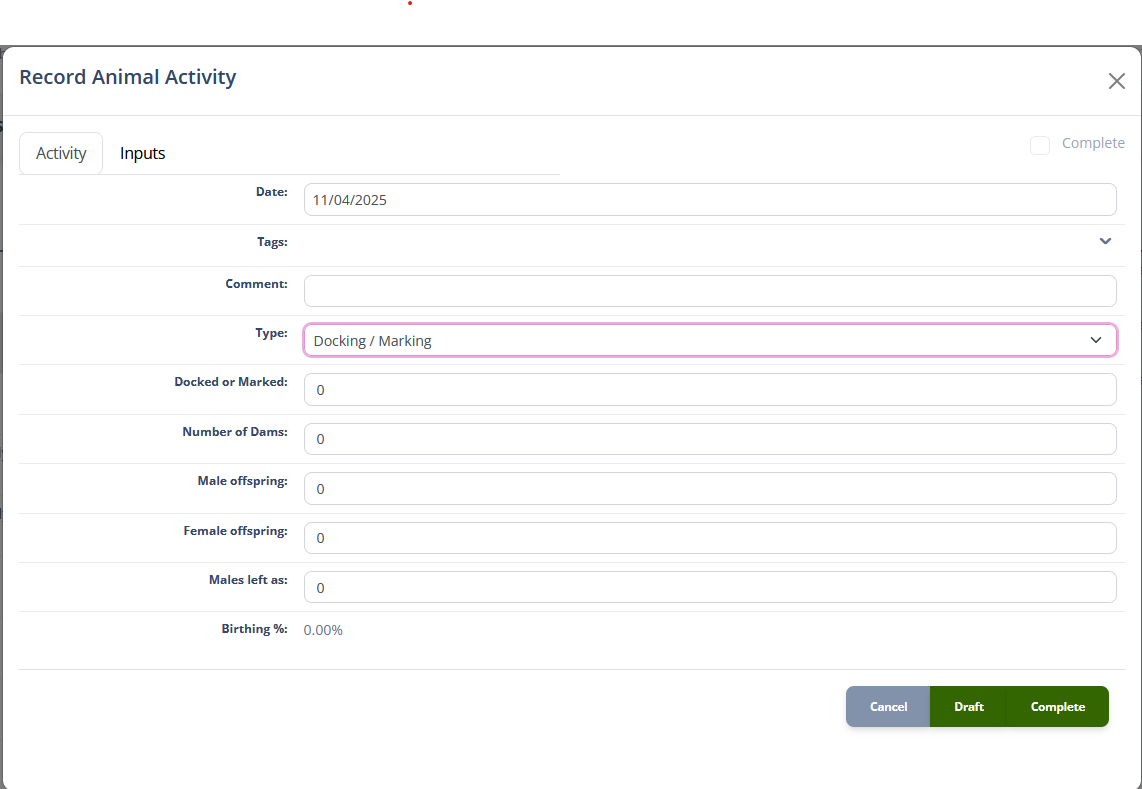
The image below shows the important parts of the screen.
The Tab Control is used to change the Details Tab between the different classes of information to record for the activity. These classes are:
The activity tab records the animal specific details of the activity. The first 4 fields of the tab are always present; the Date, Comment and the Type fields.
The Date field records the date that the activity occurred on.
The Comment field records any free-text notes you would like to add to the activity record.
The Type drop down field specifies the type of activity being recorded. Changing this field will change all the following fields, to enable you to capture the specific details of the activity. Because of the large number of activities that can be recorded for Animals in iAgri, the drop down is grouped to make it easier to find the activity you are looking for.
These are the available Activity Types:
| Group | Action | Description |
|---|---|---|
| Management | ||
| Docking / Marking | Record docking or marking animals (offspring) | |
| Stock Movement | Record moving the mob to a different paddock | |
| Supplemental Feeding | Record supplemental feeding | |
| Weighing | Record animal weights | |
| Health | ||
| Dipping | Record dipping animals | |
| Drenching | Record drenching animals | |
| Health | Record health intervention | |
| Vaccination | Record vaccination | |
| Add | ||
| Birthing | Record birth of new animals | |
| Purchase | Record purchase of new animals | |
| Acquired | Record otherwise acquired animals | |
| Remove | ||
| Transfer | Move animals to another mob | |
| Sale | Record the sale of animals | |
| Deaths | Record the on-farm death of animals | |
| Lost | Record otherwise lost animals | |
| Fertility | ||
| Mating | Record mating activity | |
| Pregnancy | Record pregnancy scan | |
| Production | ||
| Meat | Record meat processing | |
| Milk | Record milk production | |
| Shearing/Crutching | Record shearing and crutching activities | |
| Velvet | Record velvet production |
The following sections describe the activity fields that are displayed for each activity type.
| Field | Type | Description |
|---|---|---|
| Number of Dams | [number] | The number of Dams in the mob, defaulted from the selected mob |
| Castrated offspring | [number] | The number of males docked or marked |
| Female offspring | [number] | The number of females docked or marked |
| Males left as | [number] | The number of males left as males |
| Docked or Marked | Calculated Number | The total number of offspring tallied (Male + Female + Males left as) |
| Birthing % | Calculated number | The percentage of offspring calculated from the Number of Dams and Docked or Marked fields |
When the Docking / Marking activity is marked as complete, the system will update the number of animals in the mob. The number of animals will be updated the match the Number of Dams figure. For each of the offspring fields with non-zero value (Castrated, Female, Males) a new sub-mob will be created with the number of animals as specified.
These sub-mobs can be kept nested below the parent mob to simplify management until weaning. The sub-mobs will be given default generated names. Use the Mobs page to rename these mobs to suit your farming system.
| Field | Type | Description |
|---|---|---|
| Paddock | Drop down | The paddock the stock have been moved to |
| Field | Type | Description |
|---|---|---|
| Number of animals | [number] | Count of animals processed, defaulted from mob |
| Feed per head | Calculated Number | The megajoules of energy supplied per animal. This is calculated by multiplying the total amount of feed from the Warehouse stock used section of the inputs tab by the MJ/kg of dry matter for that feed and dividing that by the number of animals. |
| Field | Type | Description |
|---|---|---|
| Number of animals | [number] | Count of animals processed, defaulted from mob |
| Total weight | Mass [quantity] | Total weight of all animals |
| Average weight | Calculated number | Total weight divided by Number of animals |
| Field | Type | Description |
|---|---|---|
| Number of animals | [number] | Count of animals processed, defaulted from mob |
| Reason for dipping | Text [type-ahead] | Reason the animals were dipped, with suggestions from previous entries |
| Method | Text [type-ahead] | Method of application, with suggestions from previous entries |
| Performed by | Text [type-ahead] | Who performed the dipping, with staff names as suggestions |
| Withhold until | [date] | Date to withhold the animals from production |
Note
The button on the Withhold until field will calculate the withhold date from the agri-chemical selected in the inputs tab, if a withholding period is specified for the agri-chemical. This date can be entered manually.
| Field | Type | Description |
|---|---|---|
| Number of animals | [number] | Count of animals processed, defaulted from mob |
| Reason for drenching | Text [type-ahead] | Text entry, with suggestions from previous entries |
| Dosage | Volume [quantity] | The per-head volume of drench |
| Withhold until | [date] | Date to withhold the animals from production |
Note
The button on the Dosage field will calculate the per-animal dosage of the drench selected in the inputs tab. This value can be entered manually.
The button on the Withhold until field will calculate the withhold date from the drench selected in the inputs tab, if a withholding period is specified for the agri-chemical. This date can be entered manually.
| Field | Type | Description |
|---|---|---|
| Number of animals | [number] | Count of animals affected, defaulted from mob |
| Diagnosis | Text [type-ahead] | Diagnosis of condition, suggestions from previous entries |
| Treatment | Text [type-ahead] | Treatment actions taken, suggestions from previous entries |
| Follow up treatment | Text [type-ahead] | Further treatment actions to take, suggestions from previous entries |
| Dosage | Volume [quantity] | The per-head volume of any agri chemical used |
| Withhold until | [date] | Date to withhold the animals from production |
Note
The button on the Dosage field will calculate the per-animal dosage of the agri-chemical selected in the inputs tab. This value can be entered manually.
The button on the Withhold until field will calculate the withhold date from the drench selected in the inputs tab, if a withholding period is specified for the agri-chemical. This date can be entered manually.
| Field | Type | Description |
|---|---|---|
| Number of animals | [number] | Count of animals processed, defaulted from mob |
| Reason for vaccination | Text [type-ahead] | Reason the animals were vaccinated, with suggestions from previous entries |
| Dosage | Volume [quantity] | The per-head dosage of the vaccine applied |
| Withhold until | [date] | Date to withhold the animals from production |
Note
The button on the Dosage field will calculate the per-animal dosage the drench selected in the inputs tab. This value can be entered manually.
The button on the Withhold until field will calculate the withhold date from the drench selected in the inputs tab, if a withholding period is specified for the agri-chemical. This date can be entered manually.
| Field | Type | Description |
|---|---|---|
| Start date | [date] | Date birthing started. The Date field is the finish date |
| Number of animals | [number] | Count of pregnant animals, defaulted from mob |
| Health problems | Text [type-ahead] | Any significant health problems, with suggestions from previous entries |
| Field | Type | Description |
|---|---|---|
| Number of animals | [number] | Count of animals purchased |
| Breed | Breed | The breed of animals purchased |
| Average age | Months [number] | Average age of the animals in months |
| Average height | Distance [quantity] | Average height of the animals |
| Originated | Text | Where the animals came from |
| Previous Owner | Other Party [type-ahead] | Who the animals were purchased from |
| Sex | Sex | The sex of the animals |
| Average cost | Money [number] | Cost per animal excluding tax |
| Total cost | Money [number] | Total cost of the animals excluding tax |
| Raise bill | Checkbox | Check this to generate a supplier invoice for the purchase |
| Bill | Read only | The invoice number of the bill generated for the purchase. Click to view the bill |
When a Purchase activity is completed, the number of animals in the mob will increase by the number of animals purchased. If the Raise bill option is selected, the system will generate a proforma Bill for the purchase transaction using the information recorded.
The Total cost should not include other inputs such as haulage fees. Use the inputs tab to enter these values.
| Field | Type | Description |
|---|---|---|
| Number of animals | [number] | Number of animals added to the mob |
When an Acquired activity is completed, the number of animals in the mob will increase by the number of animals acquired.
| Field | Type | Description |
|---|---|---|
| Number of animals | [number] | Number of animals being transferred |
| Destination | Drop-down | Mob the animals are transferred to |
When the Transfer activity is marked as complete, the number of animals in the source mob will decrease by the number of animals being transferred, and the number of animals in the destination mob will increase by the same amount.
| Field | Type | Description |
|---|---|---|
| Number of animals | [number] | Count of animals sold, defaulted from mob |
| Price per head | Money [number] | The average pre-tax price received per animal |
| Total price | Money [number] | The total pre-tax value of the sale |
| Buyer | Other Party [type-ahead] | Who the animals were sold to |
| Raise invoice | Checkbox | Check this to generate a customer invoice for the sale |
| Invoice | Read only | The invoice number of the invoice generated for the sale. Click to view the invoice |
When a Sale activity is completed, the number of animals in the mob will decrease by the number of animals sold. If the Raise invoice option is selected, the system will generate a proforma Invoice for the sale transaction using the information recorded.
| Field | Type | Description |
|---|---|---|
| Number of animals | [number] | Number of animals removed from the mob |
When a Deaths activity is completed, the number of animals in the mob will decrease by the number of animals removed.
| Field | Type | Description |
|---|---|---|
| Number of animals | [number] | Number of animals removed from the mob |
When a Lost activity is completed, the number of animals in the mob will decrease by the number of animals lost.
| Field | Type | Description |
|---|---|---|
| Number of animals | [number] | Count of animals processed, defaulted from mob |
| Date put in | [date] | Date the animals were put in with the sire. The Date field is the take out date. |
| Sire breed | Breed [type-ahead] | Breed of the sire(s) |
| Birthing date | [date] | Expected birthing date |
| Field | Type | Description |
|---|---|---|
| Pregnant | [number] | The number of animals found pregnant |
| Not pregnant | [number] | The number of animals found not pregnant |
| Unaccounted | Calculated number | The difference between the sum of the pregnant and not pregnant animals, and the number of animals in the mob |
| Draft empty | Checkbox | If selected, the system will create a sub-mob named “Empty” and transfer the not pregnant animals into that mob when the activity is completed |
| Field | Type | Description |
|---|---|---|
| Number killed | [number] | Number of animals killed |
| Killed by | Other Party [type-ahead] | The Other Party that processed the animals |
| Advice Number | Text | The kill advice number |
| Terms of purchase | Text [type-ahead] | Suggestions from previous entries |
| Drafter | Text [type-ahead] | Suggestions from staff members |
| Payment received | Money [number] | The payment received for the stock |
| Grade details | Grid | The breakdown of the grades of the stock (see table below) |
| Number downgraded | [number] | Number of animals downgraded at the processing plant |
| Reason downgraded | Text [type-ahead] | Suggestions from earlier input |
| Weight of pelt/fibre | Mass [quantity] | The total weight of the animal pelts and/or fibre |
| Value of pelt/fibre | Money [number] | The total value of the animal pelts and/or fibre |
| Plus bonuses | Money [number] | The total value of any bonuses paid |
| Less deductions | Money [number] | The total value of any deductions |
Grade details The grade details splits out the grading information from the kill advice into multiple rows with the following columns:
| Field | Type | Description |
|---|---|---|
| Grade | Text [type-ahead] | The grade of the stock, suggestions from previous entries |
| Tally | [number] | The number of animals in the grade |
| Total grade weight | Mass [quantity] | The total weight of the grade |
| Value / unit | Money [number] | The value per unit of measurement |
| Total value | Money [number] | The total value of the grade |
| Value / head | Calculated money | The average value per animal |
| Button | Add a row | |
| Button | Remove a row |
The Grade Details table has two additional rows, a Total row and an Average row as below.
| Total Row | Type | Description |
|---|---|---|
| Tally | Calculated number | Total of the Tally column |
| Value | Calculated money | Total of the Total value column |
| Weight | Calculated number | Total of the Total grade weight column |
| Average Row | Type | Description |
|---|---|---|
| Value | Calculated money | Total of the Total value column divided by the Total Tally |
| Weight | Calculated number | Total of the Total grade weight column divided by the Total Tally |
Note
When a Meat activity is completed, the system will reduce the number of animals in the mob by the Number killed value.
| Field | Type | Description |
|---|---|---|
| Number of animals | [number] | Number of animals milked, defaulted from mob |
| Pick-up temperature | [number] | The temperature of the milk when picked up |
| Total volume | Volume [quantity] | The total volume of milk collected |
| Fat weight | Mass [quantity] | The total weight of fat collected |
| Fat % | Percentage [number] | The percentage of fat in the milk |
| Protein weight | Mass [quantity] | The total weight of protein collected |
| Protein % | Percentage [number] | The percentage of protein in the milk |
| Quality grade | Text [type-ahead] | The quality grade of the milk, suggestions from previous entries |
| Somatic count | [number] | The somatic cell count of the milk |
| Bacteria count | [number] | The bacteria count of the milk |
| Field | Type | Description |
|---|---|---|
| Number of animals | [number] | Count of animals processed, defaulted from mob |
| Shorn/Crutched | Dropdown | Whether the animals where shorn or crutched |
| Fleece weight | Mass [quantity] | Total weight of fleece collected |
| Fleece price / unit | Money [number] | Price per weight unit of the fleece |
| Oddment weight | Mass [quantity] | Total weight of oddments collected |
| Oddment price / unit | Money [number] | Price per weight unit of oddments |
| Total gross return | Calculated Money | Total return for fleece and oddments |
| Gross return / head | Calculated Money | Total return divided by Number of animals |
| Fibre diameter | [number] | Average diameter of the collected fibre in microns |
| Buyer | Other Party [type-ahead] | The Other Party the fibre was sold to |
| Field | Type | Description |
|---|---|---|
| Number of animals | [number] | Count of animals processed, defaulted from mob |
| Total Antler weight | Mass [quantity] | Total weight of the antlers |
| Antler grade | Text [type-ahead] | The grade of the antlers, suggestions from previous entries |
| Price / unit | Money [number] | The price per unit of weight |
| Total gross return | Calculated Money | Total return from the sale |
| Gross return / head | Calculated Money | Total return divided by Number of animals |
| Buyer | Other Party [type-ahead] | The Other Party the fibre was sold to |
The Inputs Tab provides an area to record direct costs of the activity. These can be linked to other areas of the iAgri system such as the Warehouse and Staff records. Recording the actual costs of livestock activities provides the data the iAgri will use to help you optimise the financial efficiency your business.
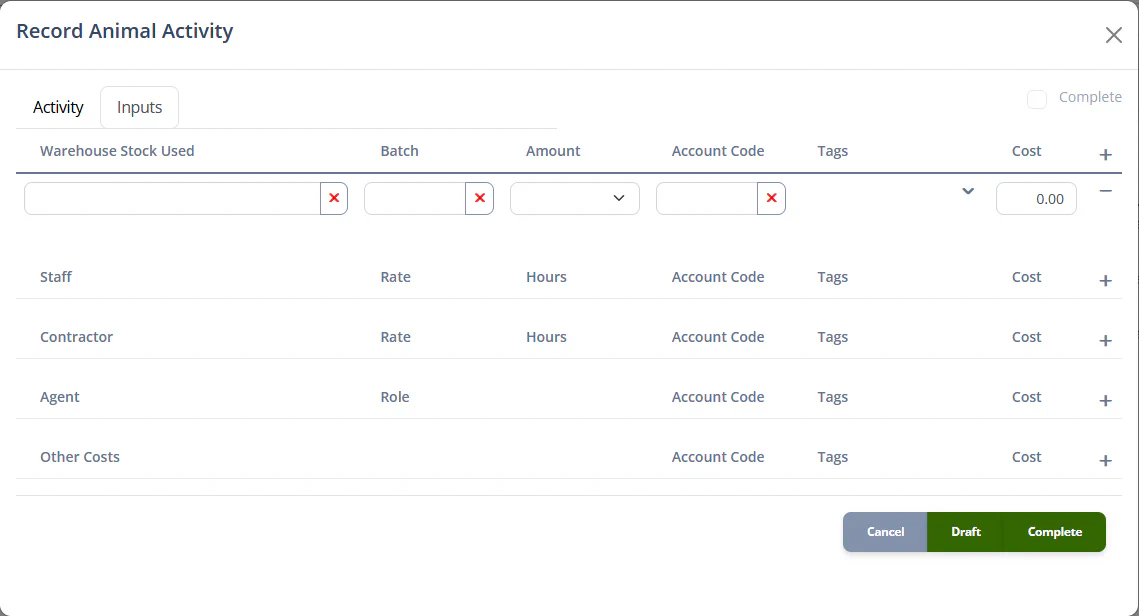
Inputs can be recorded in specific sections as documented below. A calculated total of all costs is displayed in the Total field below the data entry sections.
Each input line item maps onto an Internal Transaction which is used to track the financial performance of your farm.
All input types have the common fields.
| Field | Type | Description |
|---|---|---|
| Tags | List of Financial Tag [tags] | Financial tags associated with the transaction. |
| Account Code | Account Code [type-ahead] | The financial account to categorise the transaction into. |
| Cost | Money [number] | The before-tax cost of the input. This value will be automatically calculated from the other fields where possible, but can also be entered directly. |
| Field | Type | Description |
|---|---|---|
| Warehouse stock used | Stock Item [type-ahead] | A product from the warehouse used in the activity. |
| Batch | Text [type-ahead] | The specific batch of the product used. |
| Amount | Quantity [quantity] | The amount of the product used. |
| Field | Type | Description |
|---|---|---|
| Staff | Drop down | The staff member who performed the activity. |
| Rate | Money [number] | The hourly rate of pay for the staff member, defaulted from the Staff record. |
| Hours | Number [number] | Hours worked. |
| Field | Type | Description |
|---|---|---|
| Contractor | Other Party [type-ahead] | The contractor who performed the activity. |
| Rate | Money [number] | Hourly rate for the contractor |
| Hours | Number [number] | Hours worked |
| Field | Type | Description |
|---|---|---|
| Agent | Account Code [type-ahead] | The agent involved in the transaction. |
| Role | Text [type-ahead] | What type of agent, with suggestions from previous entries. |
| Field | Type | Description |
|---|---|---|
| Other costs | Text [type-ahead] | Miscellaneous cost, with suggestions from previous entries. |
| Button | Action |
|---|---|
| Draft | Save the animal activity record and mark it as a Draft, close the dialog |
| Complete | Save the animal activity record and mark it as Complete, close the dialog |
| Cancel | Close the dialog and do not save any data |
An animal activity record can be saved as a Draft. This allows you to record activities as they happen, even if you do not know all the details at the time.
For example, a staff member may record an activity as a draft at the time it happens, without knowing full details of what costs are associated. Later you can update the draft and add additional inputs, before marking it as complete.
The current status of the record is represented by the Complete checkbox in the Detail Tabs bar. This will be checked when the status is Complete and unchecked when it is Draft.