Title here
Summary here
The iAgri Cashbook enables you to keep track of money flowing into and out of your bank accounts. The Cashbook page displays your bank accounts with the current balance of each.
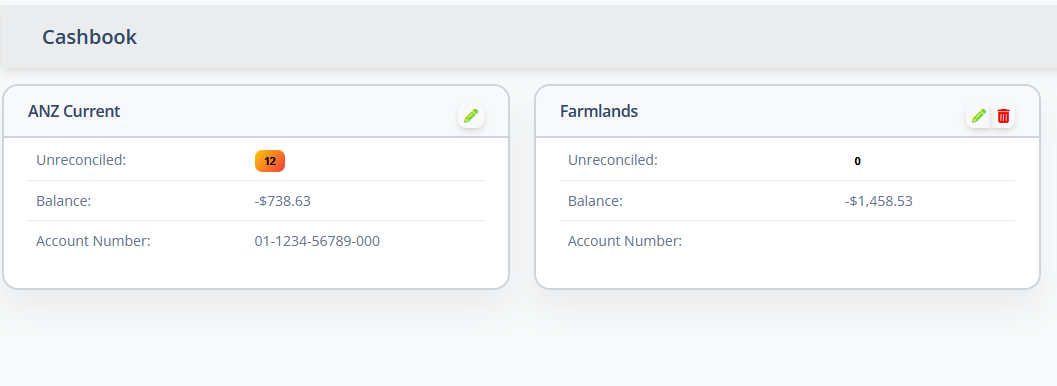
The details of each bank account are displayed:
| Field | Meaning |
|---|---|
| Name | This can be any descriptive name you would like. Clicking the name will open the bank transactions for the account. |
| Unreconciled | Displays a count of the number of bank transactions that have not yet been reconciled. Clicking on this number will open the reconciliation page. |
| Balance | The current balance of the account. |
| Account Number | The bank account number, for reference. |
These details can be edited by clicking the button.
The button can be used to delete the account.
Note
The opening balance can only be edited until the account has some transactions in it. After that, the balance is the sum of the opening balance and all the transactions in the account.
A bank account cannot be deleted if it has bank transactions. All transactions must first be deleted from the bank transactions page.
To get started, add one or more Bank Accounts to the Cashbook. Use the button to create a new account.
The system will present a new, blank, Bank Account panel for you to enter the account details: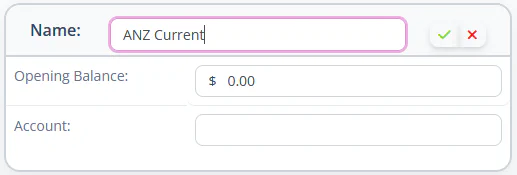
| Field | Meaning |
|---|---|
| Name | The descriptive name of the bank account. |
| Opening Balance | This should be the balance of the account just before the first bank statement that you want to import. |
| Account | The Bank Account number |
Enter the details for the account and click the button to save the new Bank Account.
Once you have added a bank account, click on the name of the account tog to the bank transactions page for the account and import transactions.