Title here
Summary here
The Other Parties page lists all the external entities the business deals with, including suppliers, customers, agents, contractors regulators and government authorities.

The Other Parties List follows the standard List Page Actions paradigm.
Editing is done in a modal Dialog.
The Other Party dialog enables you to record all the relevant information about an Other Party. It is divided in to 4 tabs as documented below.
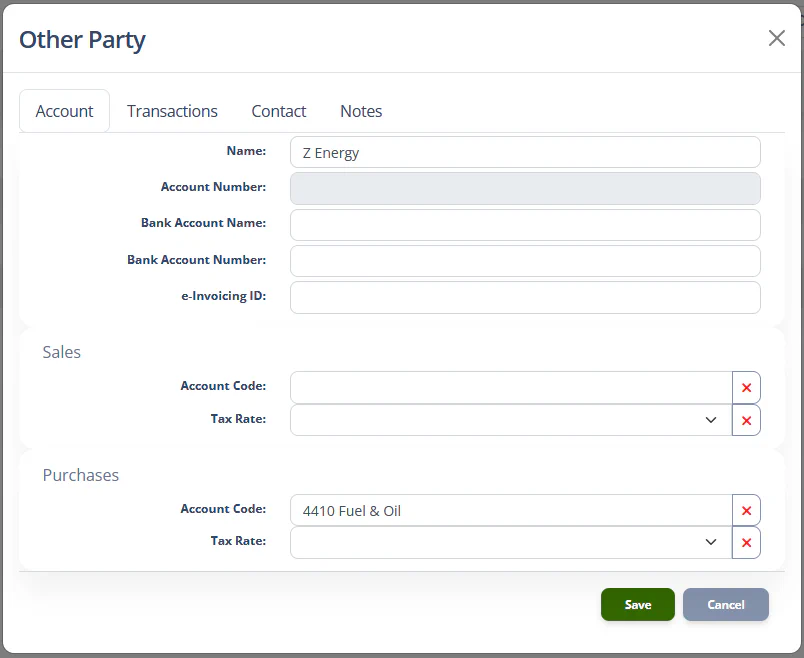
This tab contains the basic information about the Other Party and default Account Code values for when the Other Party is match during reconciliation
| Field | Type | Description |
|---|---|---|
| Name | Text | The name of the person or organisation |
| Account number | Text | This value is auto generated the first time an Invoice is generated for the Other Party |
| Bank Account Name | Text | The name of the account any payments are made to. |
| Bank Account Number | Text | The account number that any payments are made to. |
| e-Invoicing ID | Text | If your site is registered for e-Invoicing, the other party’s e-Invoicing ID should be entered here so the system can send and receive invoice to and from the Other Party. |
| Sales Account Code | Account Code [type-ahead] | The default account code to assign to credit transactions that are reconciled to this Other Party. |
| Sales Tax Rate | Sales Tax Rate dropdown | The default tax rate to assign to credit transactions that are reconciled to this Other Party. |
| Purchases Account Code | Account Code [type-ahead] | The default account code to assign to debit transactions that are reconciled to this Other Party. |
| Purchases Tax Rate | Sales Tax Rate dropdown | The default tax rate to assign to debit transactions that are reconciled to this Other Party. |
Note
In most cases, you should not need to assign specific Tax Rates to Other Parties. It is better to set a default Tax Rate for purchases and sales, and let the system use that as the default. It would be useful to set a specific tax rate if, for example, there was an off-shore customer, and all sales to them were zero-rated.
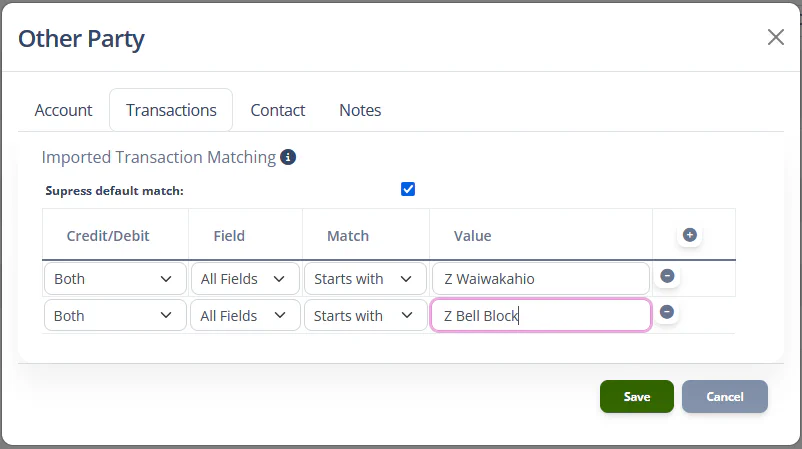
This tab can be used to configure transaction matchers to help the system match this Other Party to bank transactions during the reconciliation process.
| Field | Type | Description |
|---|---|---|
| Suppress default match | Checkbox | If checked, the system will not try the default strategy of matching all available bank transaction fields against the other party’s name when searching for an Other Party for a bank transaction. |