Title here
Summary here
The scheduled task dialog enables you to record a Scheduled Task in the system for you or someone else to do. You can use this function to track labour resources and ensure that important tasks are performed in a timely manner. Completed tasks can be used to track worker hours when calculating wages.
Tasks entered here are added to the schedule for assigned users.
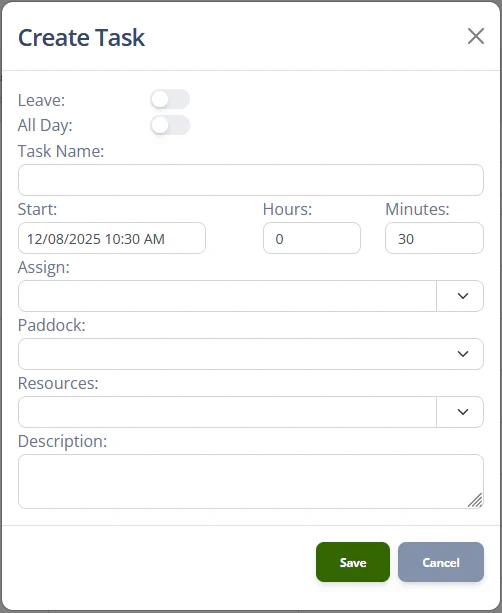
The Schedule task dialog has the following fields:
| Name | Type | Description |
|---|---|---|
| Leave | [toggle] | Toggles between entering a tasks and entering leave. |
| All Day | [toggle] | Sets the duration of the task to “All Day”. |
| Task Name | Text | Headline description for task. |
| Start | Date picker | Date and time for the task is scheduled to start. |
| Hours | [number] | Hours duration of the task. |
| Minutes | [number] | Additional minutes duration of the task. |
| Assign | Dropdown | Selects one or more users to assign the task to. |
| Paddock | Dropdown | Selects a location for the task to be performed in. |
| Resources | Dropdown | Assigns vehicles or map items to the task to be performed. |
| Description | Text | Detailed description of the task. |
Note
The Leave toggle will only be available if the Scheduled Task Dialog is invoked from the Schedule for a User who is also a Staff Member.
If a scheduled task is created with no user assignments it will be added to your Unassigned tasks list. If it is created without a start date and a duration, it will be added to the Unscheduled tasks list for any users the task is assigned to.
The Paddock and Resource fields may not be available at some subscription levels.
If the Leave toggle is switched to “On” the dialog can be used to record a Leave Date.
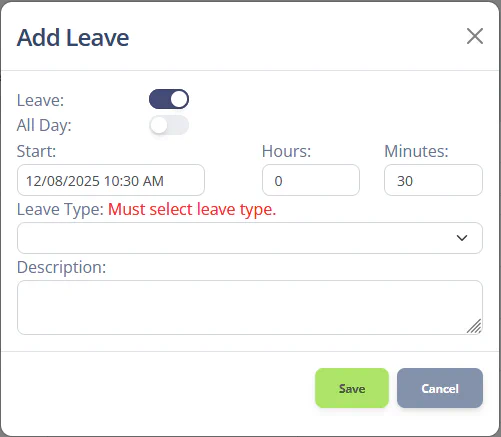
When entering a leave date, the following fields are available:
| Name | Type | Description |
|---|---|---|
| Leave | [toggle] | Toggles between entering a tasks and entering leave. |
| All Day | [toggle] | Sets the duration of the task to “All Day”. |
| Start | Date picker | Date and time for the leave to start. |
| Hours | [number] | Hours duration of the leave. |
| Minutes | [number] | Additional minutes duration of the leave. |
| Leave Type | Dropdown | Selects the type of leave being taken. |
| Description | Text | Any notes to record with the leave date. |