Title here
Summary here
iAgri enables you to manage your Staff Member records within the system. Payroll, time sheets and leave management tasks can all be performed within iAgri. The starting point for this is the Staff Members page, where you can define your staff members and record their personal, salary and taxation information.

The Staff Members follows the standard List Page Actions paradigm. Editing individual staff members occurs in the Staff Member Editor.
The Staff Member Editor enables you to record all the important details for a staff member. When viewing a staff member, the data entry fields are read only. Click the button on the tool bar to begin editing.
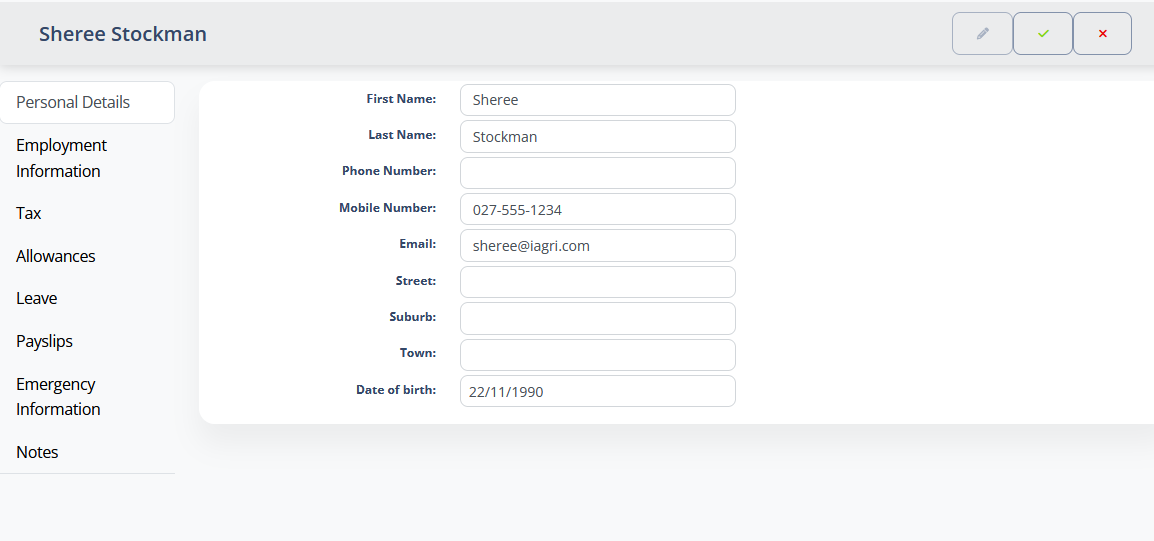
Because of the large amount of information that is potentially captured for a staff member, the editor is divided in several sections with a tab control on the left of the page to enable you to select a subsection as defined below.
This section contains the basic contact information for a staff member.
| Field | Type | Description |
|---|---|---|
| First Name | Text | The staff member’s given name. |
| Last name | Text | The staff member’s family name. |
| Phone number | Text | The land-line number for the staff member. |
| Mobile Number | Text | The staff member’s mobile phone number. |
| Text | The staff member’s email address. | |
| Street | Text | The house number & street name of the staff member’s address. |
| Locality | Text | The local area part of the staff member’s address. |
| Town | Text | The town or regional part of the staff member’s address. |
| Date of Birth | Text | The date of birth of the staff member. |
Note
The email address captured here will be used to send the staff member payslips and other employment related messages.
This section contains the wage or salary information.
| Field | Type | Description |
|---|---|---|
| Hourly / Salary | Text | Contains either the hourly wage rate or the yearly salary figure for the staff member. |
| Overtime rate | Money | The hourly overtime pay rate for the staff member. |
| Hours Per Week | [number] | The hours per week that the staff member is expected to work. |
| Start Date | Date picker | The date that employment commenced. |
| Finish Date | Date Picker | For employees who’s employment has terminated, this is the final day of work |
This section contains the taxation information for a staff member.
| Field | Type | Description |
|---|---|---|
| IRD Number | Text | The staff member’s income tax ID. |
| Tax Code | Drop down | The tax code used to calculate pay for the staff member. |
This section is used to manage any untaxed allowances that apply to the staff member. The list of available allowances can be configured in the Allowances page.
To apply an allowance to a staff member, check the checkbox for that allowance in the list.
The section enables you to specify how much leave of each type a staff member is entitled to, and to enter and maintain leave dates the track how much leave they have taken.
The list of leave types available in the Allowances table of this page is maintained using the Leave Types page. You can specify how many hours the staff member is entitled to each year in the Allowances table.
The Leave dates table records leave that the staff member has taken, or will take in the future. Leave dates can be added directly in the table. The can also be added using the Schedule page. Any Leave Date records added through the Schedule page will also be displayed here.
this section contains a list of all payslips that have been generated for a staff member. You can view a payslip from here and print or email it.
This section contains the emergency contact details for a staff member, and their blood type.
| Field | Type | Description |
|---|---|---|
| Blood type | Text | The staff member’s Blood Type. |
| Emergency Contact Name | Text | The name of a person to contact should an emergency arise involving the staff member |
| Emergency Contact Phone | Text | The phone number for the staff member’s emergency contact |
Any free form notes for the staff member.