Title here
Summary here
The Stock Item Editor enables you to create or update a Stock Item record, and view the history of any purchases, sales usage or stock adjustments for the product. The Product tab displays the product details and the History tab displays the history of the product.
The Product tab records the details of a Stock Item that will be managed in the iAgri Warehouse.
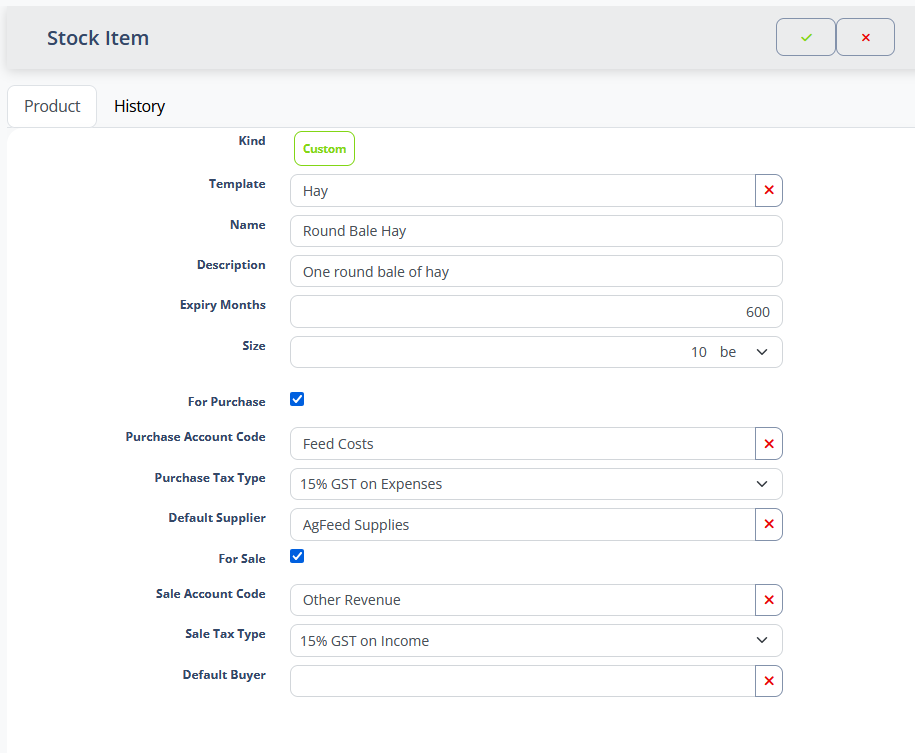
The iAgri system contains a huge library of products from third party suppliers that you can track in your warehouse. You can also create your own customised products to record items specific to your farm.
The Kind field can be toggled to track either a pre-defined “System” product, or a “Custom” product that belongs to your site.

When toggled to “System”, the Product field is displayed and you can use the this type-ahead field to select a system product to track. The Name, Description, Expiry Months, Measurement Unit, and Size fields all become read-only and display pre-defined values.

When toggled to “Custom”, the Template field is displayed and you can use the this type-ahead field to select a Product Template from which to create a product. The Name, Description, Expiry Months, Measurement Unit, and Size fields all become editable and you can enter values that describe the product.
| Field | Meaning |
|---|---|
| Kind | Determines whether this record tracks a pre-defined product or a site-specific one. |
| Product | The system product this product is based on. Visible for pre-defined System products. |
| Template | The product template this product is based on. Visible for custom Site products. |
| Name | The display name for this product. |
| Description | Extended description of the product. |
| Expiry months | When a product has a shelf life, entering this value will cause the system to generate a default expiry date for any new batches of the product added to the warehouse. |
| Measurement Unit | Specifies the measurement units used to record volumes of the product. |
| Size | The number of measurement units that make up one unit of the product in the warehouse. |
| For purchase | This field indicates that the product is something you will purchase from an outside supplier. |
| Cost | Specifies the default tax-exclusive cost of one unit of the stock item, if known. |
| Purchase account code | Specifies the default account code to use when new volumes of the product are purchased. |
| Purchase tax type | Specifies the default tax type to apply to purchases of the product. |
| Default supplier | Specifies the default supplier to use when purchasing new volumes of the product. |
| For sale | This field indicates that the product is something you will sell to outside customers. |
| Price | Specifies the tax-exclusive price you will charge for one unit of the stock item. |
| Sale account code | Specifies the default account code to use when volumes of the product are sold. |
| Sale tax type | Specifies the default tax type to apply to sales of the product. |
| Default buyer | Specifies the default purchaser to use when selling volumes of the product. |
Notes
The history tab lists all the changes to the balance (stock on hand) of a product in the Warehouse. Items are displayed sorted by date with the most recent change at the top of the list.
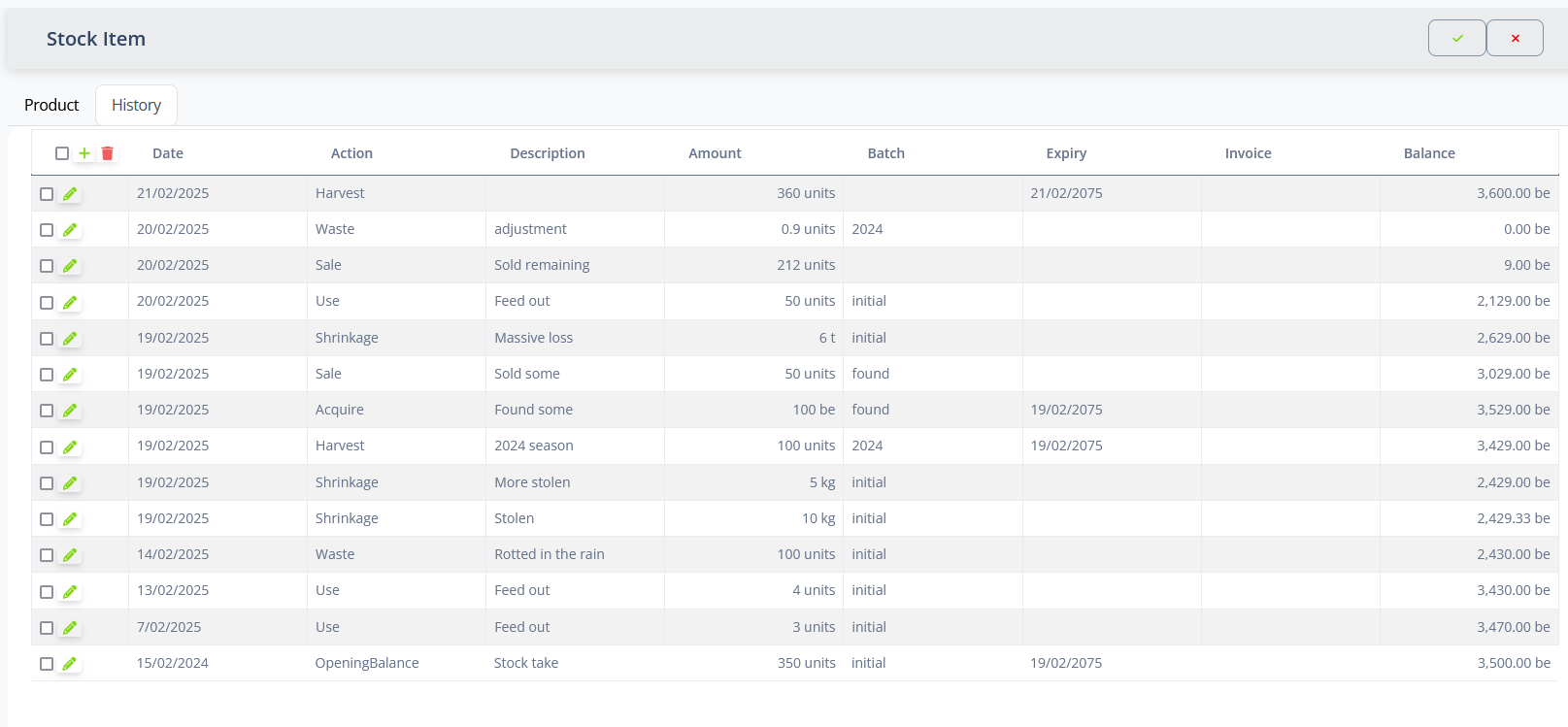
| Field | Meaning |
|---|---|
| Date | The date that a change to the balance occurred. |
| Action | The action that occurred to change the balance. |
| Description | A description of the action taken. |
| Amount | The number of measurement units of the product added or removed. |
| Units | The measurement units used to measure the product volume. |
| Batch | The batch reference affected by the change. |
| Expiry | For Purchase or Harvest actions of perishable products, the date on which this batch of the product expires. |
| Cost | For actions that increase the balance, this field records the total cost of acquiring the product, so that the cost can be portioned to on-farm activities. |
| Invoice | For Purchase or Sale actions, the invoice number of the related supplier or customer invoice. Clicking on this field will open the related invoice. |
| Balance | The remaining balance of the product in the warehouse after the action occurred. |
The following table describes the valid actions for products in the Warehouse.
| Action | Effect on the balance | Description |
|---|---|---|
| Purchase | Increase | Product has been bought. |
| Harvest | Increase | Product has been harvested. |
| Acquire | Increase | Product has been otherwise acquired. |
| Opening Balance | Increase | Records the initial volume of the product. |
| Sale | Decrease | Product has been sold. |
| Use | Decrease | Product has been used. |
| Waste | Decrease | Product has been disposed of without being used. |
| Shrinkage | Decrease | Product has disappeared from the warehouse for unknown reasons. |
Notes
The history list supports the Standard List Actions. clicking the edit action will open and in-line editor for the history line item. The list uses infinite scroll to load more items as you scroll down the list.